How to develop and manage a data sharing agreement
Follow the steps below to develop a BUCP under the IDEA. Typically, a BUCP will be initiated by a Data Recipient to request data from a Data Provider. However, all parties may work together to develop a BUCP. These two roles are referred to throughout this guidebook and in the IDEA and BUCP template.
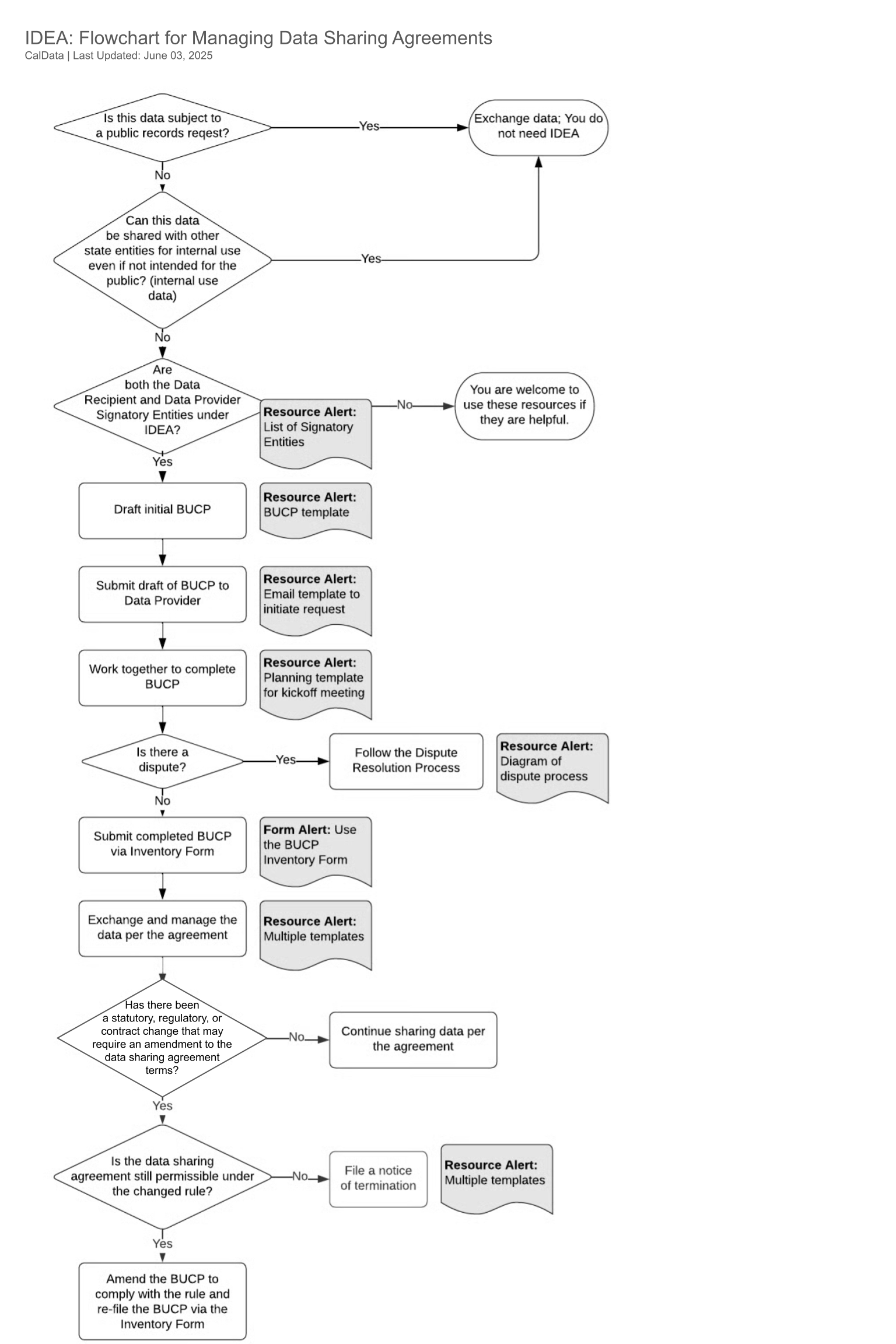
Flowchart: We’ve created a flowchart that supports the steps below.
Step 1. Determine if you need to use the IDEA
The IDEA is designed for data that requires protection and cannot be freely shared across state entities. Typically this means the data faces restrictions on disclosures to other state entities under federal or state law due to privacy or security reasons.
The IDEA does not apply to public, non-confidential data. In addition, it does not apply to non-confidential, internal use data that you share with other state entities even if the data is not intended for public use. For these cases, treat data sharing as a normal part of business.
Step 2. Confirm that all parties are signatories to IDEA
All state agencies under the Governor’s authority and their reporting departments have signed IDEA, in addition to several other entities. Confirm that the Data Recipient(s) and the Data Provider(s) are signatories on the agreement. If one or the other is not a signatory, you are welcome to use the IDEA agreement and BUCP templates as a starting point but are not required to do so. We encourage the entity that has not yet signed onto IDEA to do so and are happy to review it with them. For more information and help getting onboarded to IDEA, reach out to caldata@innovation.ca.gov.
See the list of signatories to confirm
Step 3. Draft initial Business Use Case Proposal (BUCP)
The BUCP template is the document you will use to finalize your data sharing agreement. The Data Recipient’s program staff who will use the data should draft the initial BUCP. At this time, work with the program team to develop this draft. Later in the process, you can engage your Executive Sponsor and additional review teams. The template is broken down into the following sections:
| Section | Description | How to use at this stage |
|---|---|---|
| Instructions and Checklist | This checklist will help guide you through the required set of reviews and approvals of the BUCP. | Leave blank for now. This is part of the discussion process. |
| Business Case Fields | Fields that provide an overview of the program and business needs for this data along with basic contact information. | Complete initial draft. The Data Recipient is primarily responsible for completing these fields. |
| Technical Fields | Fields that describe the data in detail as well as the means of transfer and management, including destruction and/or return. | Complete initial draft. The Data Recipient and Data Provider will need to iterate on this during discussions. |
| Administrative Fields | Fields that address risks, legal authority, transfer of funds, and additional protections or approvals. | Draft fields as possible. The Data Provider will need to help complete these fields based on discussion with the Data Recipient. |
| Signatures and Approvals | This is the set of final program approvals. | This is the final step of the process. Once the BUCP is signed, data sharing can begin. |
Step 4. Submit the draft BUCP to the Data Provider
Once the Data Recipient has a working draft BUCP, they should identify the appropriate contact at the Data Provider. A good initial starting point is the program contacts for the data, who are in the best position to help you develop the BUCP. They can bring in additional groups as necessary including legal, privacy, technology, and security.
At this time, we do not have a list of data coordinator contacts by state entity for initiating the BUCP process.
You can start with the email template to initiate a request
Step 5. Work together to complete the BUCP
All entities’ programs should work together to complete a draft BUCP for approval. Typically, a completed draft will require input from your legal, privacy, security, and technology teams.
If there is a dispute while developing the BUCP, please follow the dispute resolution process. Disputes fall into three categories:
- Data Provider objects to the data exchange
- Disagreement on the method for de-identification
- Disagreement on costs
See related templates for Planning for a BUCP kickoff meeting
Step 6. Submit the final BUCP to the Statewide Chief Data Officer
The Data Recipient must file the final BUCP via the BUCP Inventory Form. This is for tracking and auditing purposes only (there is no 'approval' that happens by CalData). Once submitted you should move immediately to Step 7 to begin exchanging the data.
Step 7. Exchange and manage the data per the agreement
Follow the terms of the agreement to exchange and manage the data. Below we included a series of templates that may be useful under several of IDEA’s clauses.
Useful templates:
Step 8. (If needed) Update the BUCP.
There may be legal reasons for updating the BUCP. If the rules for sharing data change because of new laws or contracts, you need to check if the BUCP (Data Sharing Agreement) needs to be updated. If the legal or privacy experts say it's necessary, you might need to change the BUCP to keep the agreement going, or you might need to end the BUCP.
Option 1: Change the BUCP and file it again
If the data sharing is still permissaible under the new rules, update the BUCP to match the new legal and privacy rules. Get the right approvals from the relevant department and file the BUCP again using the BUCP Inventory Form. If the data sharing isn't allowed anymore, you can end the agreement.
Option 2: End the BUCP
There are two times when you might need to end a BUCP:
- If the termination is due to statutory, regulatory, or contractual changes, under §5.14 of IDEA, the Data Provider must notify the Agency Chief Data Officer or the Agency Information Officer of the action and reasons.
- Under §7.4 of IDEA, if the Data Provider determines that the Data Recipient has violated a material term of the agreement, they may terminate the agreement. The Data Provider must immediately notify the Data Recipient and Chief Data Officer.
Useful templates:
Flowchart for managing data sharing agreements